MoonPress Studio
Download Shuttle

The AI workspace for the WordPress site you already have.

Shuttle puts marketers in control. Change copy, pages, SEO and design by prompting, without waiting for a developer or a designer.

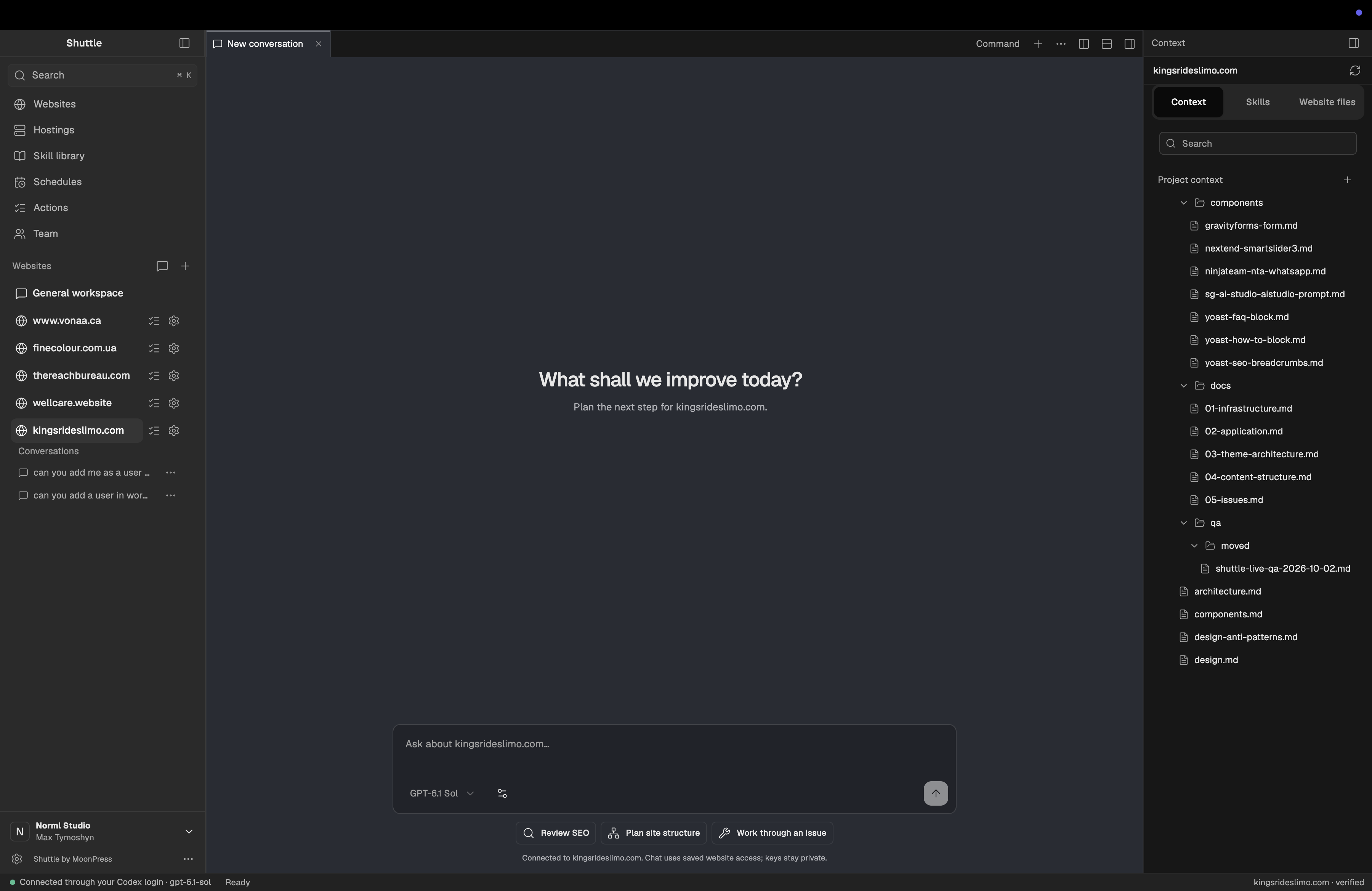
Actual Shuttle desktop workspace showing a new conversation and website context
Shuttle’s desktop workspace with website context.View full-size screenshot

Meet Shuttle in one minute.

A short introduction from me, Max, founder of MoonPress.

Breathe new life into your WordPress website.

Bring AI into the WordPress website you already have.

  • Build on what exists

    Keep your site, content and established design.

  • Move everyday work forward

    Make changes without the usual back-and-forth.

  • Keep the work in-house

    Give your marketing and SEO team a practical starting point.

Polaclub website presentation

We helped Polaclub cut agency overhead and ship changes faster.

Bob wanted to improve his store himself. After we set up our WordPress + AI workflow, he worked through checkout, backend, plugin and database changes that had been sitting in his plans.

Read the case study

…in one month I did everything I’d planned for two years of work.

Bob · Polaclub owner · July 20, 2026
Coxit website

We helped Coxit bring website changes into its own hands.

Julia learned to direct AI on Coxit’s existing website, with its design system guiding the work and expert support available when she needed it.

Read the case study

It does everything really well once you figure out how to prompt it properly.

Julia · Coxit · August 12, 2026
Max Tymoshyn, founder of Norml Studio

Why I've built the Shuttle

I built this system for myself first. It lived in my VS Code, in the technical part of my work. Then I installed it for my team, and my SEO specialist started doing work 10 times faster than my developers and designers.

Then I installed it for a few clients. A marketer at one business and a founder at another started making website changes themselves and stopped buying those services from us. We lost thousands of dollars in revenue because they could now do the work themselves.

But the money wasn’t the most important part. One client built everything he’d planned for the next two years himself in one month. That’s when it clicked for me how much value there was in this system. He didn’t have to go through our usual project manager, designer and developer process. He built fulfillment, discount and warehouse functionality for his e-commerce store just by explaining how he wanted it to work. We connected the system to his existing website, without rebuilding anything.

Owners and teams working directly on the WordPress websites they already have. These stories come from WordPress Fuel, the AI-assisted workflow we developed before Shuttle. That experience now informs Shuttle by MoonPress.

Start with the improvement you have in mind.

Improve a page

Update the copy and reuse the design.

Add content

Put approved text in the right fields.

Implement SEO

Apply a scoped decision and check it.

Investigate an issue

Understand what is happening before changing it.

Examples of AI-assisted WordPress work. Check compatibility for current task support.

Connect your site. Start a task.

Connect the hosting, select your website and let AI learn its structure. Then begin with one clear change you can review.

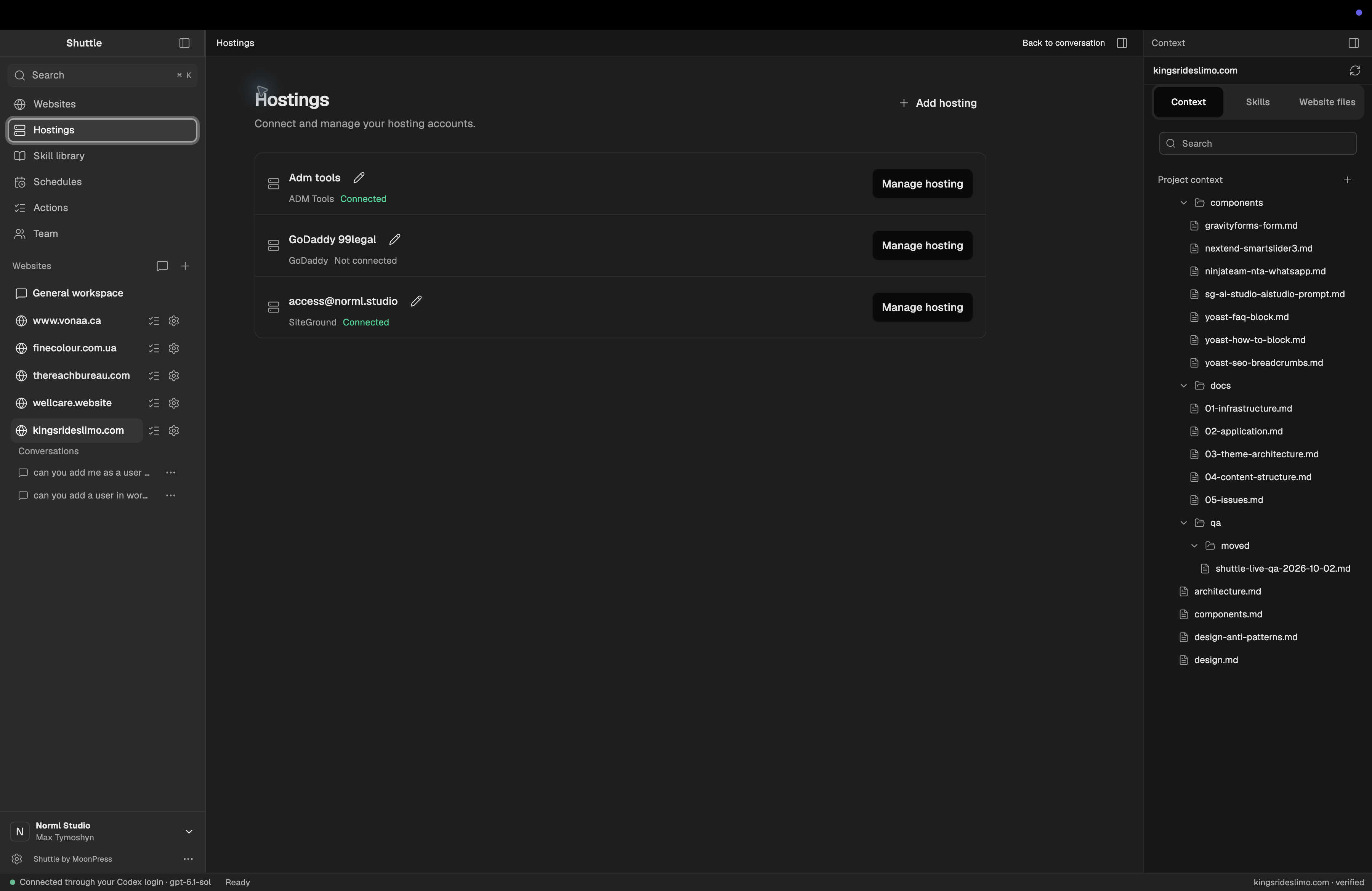
Actual Shuttle hosting account overview
Hosting accounts in Shuttle.View full-size screenshot

Give AI the context it needs.

Your website has its own structure, design and rules. Keep that knowledge with the task so AI has a useful starting point.

Keep your website’s knowledge close.

Store the site’s structure, design rules and reusable sections with the project. Each new task starts with that context.

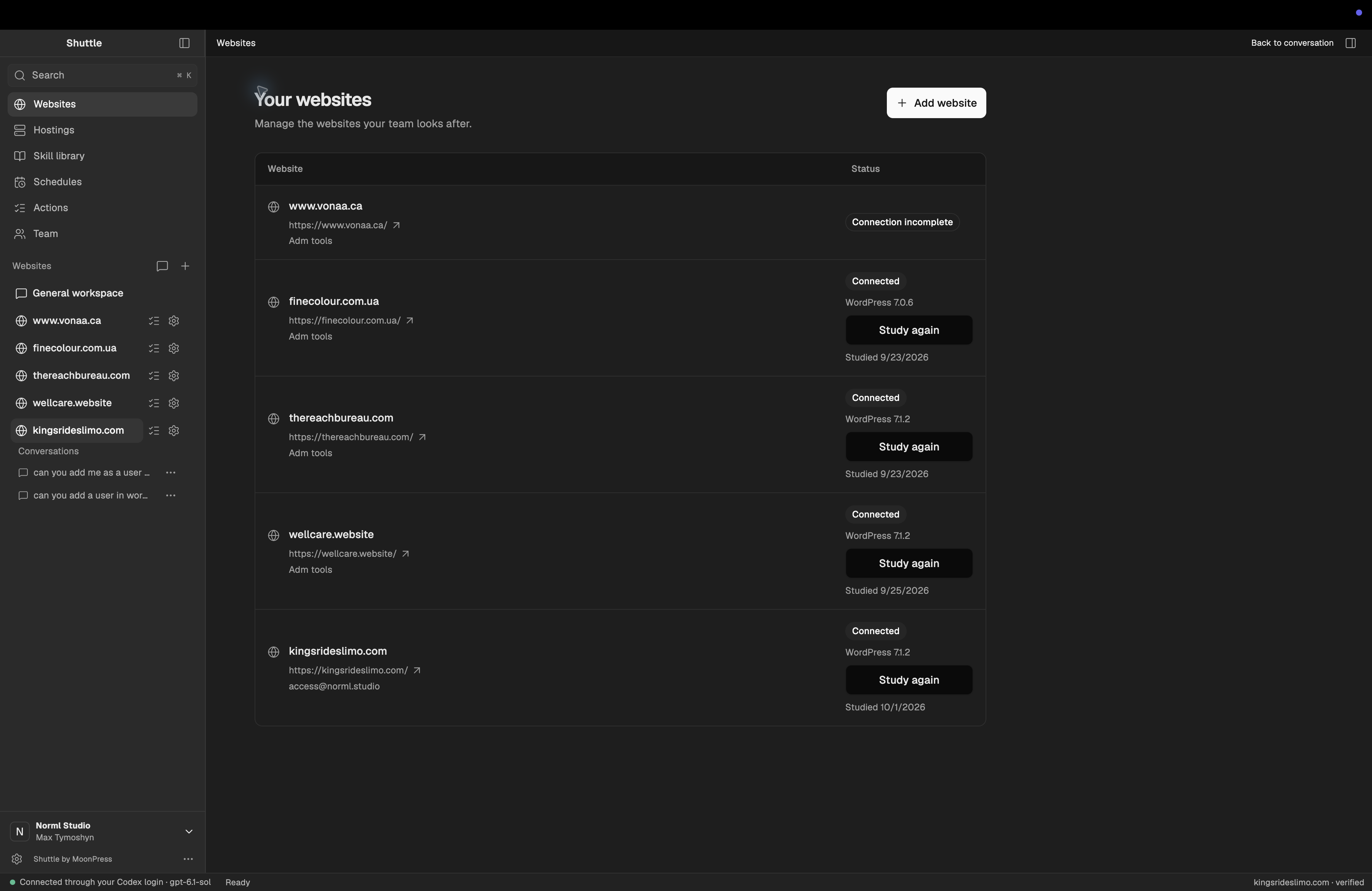
Actual Shuttle website connection overview
Website connections in Shuttle.View full-size screenshot

Your site. Your AI account.

Keep your existing WordPress website and hosting. Connect your own supported Claude Code or Codex account; provider subscriptions and usage remain separate.

See what changed.

Review the page, links and affected behavior before release. Check the live result afterward. AI can make mistakes.

Choose how you want to start.

Explore Shuttle

Public trial registration is not open yet. Existing customers can log in.

Learn the DIY method

Follow the guide to prepare an existing WordPress site for AI-assisted work. Technical setup may need your developer.

Get help with setup

WordPress Fuel is our separate one-off setup and workshop service at Norml Studio. Your team learns the workflow and keeps the project.

Tools for the people behind WordPress websites.

Shuttle by MoonPress brings website work and your own AI account into a desktop workspace.

MoonPress Chat is a separate WordPress support chatbot for the people visiting your site. You can use Chat independently of Shuttle.

Before you begin.

Do I need to rebuild my website?

No. Shuttle is built for existing WordPress websites, including complex, legacy sites that are hard to rebuild. Which tasks are practical depends on the site’s structure and the access available.

Is AI usage included?

You use your own supported AI account. Your provider’s plan and usage limits apply separately.

Can AI make mistakes?

Yes. Review the output and test affected behavior. Saved instructions help guide work, but checking is still necessary.

Does every hosting provider work?

Provider support needs to be verified for your connection. Check current compatibility before planning an operation.

Can I use the app today?

Your 7-day trial starts at registration and includes one website and unlimited teammates during the trial. Then $49 per website/month. Public trial registration is not open yet. Existing customers can log in. Card required. Trial starts at registration. Automatic payment is on by default after the trial. Switch it off any time in Billing; do so before the trial ends to avoid the first charge. No dark patterns. Pay only if you like how it works. See pricing and setup.

How is Shuttle different from MoonPress Chat?

Shuttle is for the person working on the website. Chat answers visitors’ questions on the website.